
The main feature of this release is the change on the Project Overview.
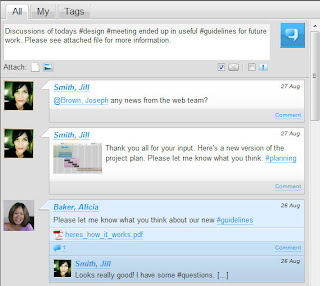
To understand why we are so excited about this release it's important to understand what we believe are the crucial factors to project success:
-We believe that the key to successful projects is to help people share information and manage their commitments.
-We believe that projects with the courage to open up communication and share information transparently to create trust will be the ones most likely to succeed.
This is why we introduce conversations on the Project Overview. For those of you who don't use Facebook, this can be a chance to see what the hype is all about. Use the conversations to:
-Inform everyone about important desicions
-Share tips and tricks
-Share ideas and inspiration
-Comment and converse about links, documents, pictures and videos
-Ask questions
-Keep everyone updated on the status of your work
Some of you have tested the conversations during the beta test. Thanks, your input is invaluable for the development of the final version. Here's some of the feedback that has been implemented in this version
http://ideas.projectplace.com/feedbacks/56854-give-the-adminstrator-more-power-ig-to-delete-messages-in-the-discussion-forum
http://ideas.projectplace.com/feedbacks/56246-post-erasure
http://ideas.projectplace.com/feedbacks/53791-category-for-information-on-project-wall
Some other ideas are high on the list of features that we want to implement like:
http://ideas.projectplace.com/feedbacks/55560-wall-indicator-updated-thread
http://ideas.projectplace.com/feedbacks/56244-forum-topic-queue
So what is @referencing all about anyway?
@referencing is a way to notify and highlight specific project members in a post. The member shows up as a clickable link in the post and will also automatically be notified my email.
So what is hashtagging all about anyway?
Use a tag preceeded by # to organise your information and conversations. So to tag something, just type # followed by the desired tag, e.g. #requirements, #products, #risk. The tags show up under a special tab or you can just click on the tag to reveal all posts and comments that contain the same tag.
We have removed some features like the shout box for the Project Manager and the News section. The News will still be available, but only via the Project Site.
Upload several documents at once
Finally, I know that you have waited. But now it's here...the possibility to upload multiple documents through the "Upload file" button in Documents. You can also put the uploaded documents under version management all at once.
The following ideas can benefit from the new function:
http://ideas.projectplace.com/feedbacks/52710-get-rid-of-the-plugin
http://ideas.projectplace.com/feedbacks/50829-complete-folder-structure
http://ideas.projectplace.com/feedbacks/48303-automatic-versionmanagement-at-upload-of-files-and-folders-in-a-folder-structure
http://ideas.projectplace.com/feedbacks/46533-upload-multiple-files
Define your project role per project
Most of our users are part of only one project at Projectplace, but an increasing number are members of many projects in which they have different roles. You can now define which role you have in each project. Just log in and go to the People tab in your project. Click on "enter project role" under your name and enter the role you have in that project. Administrators can update the role of any member.
As usual we are happy to receive feedback about the new release, both positive and negative, over on Projectplace Ideas.
Karolina


